AI images, inside After Effects.
Summon's Image tab creates new images from a prompt and edits existing ones, including the frame under your playhead, without leaving After Effects. Results come back into your project, ready for the timeline or as references for video.
Create or edit
- Text to image. Choose a model, describe the image, set the size, and click Generate.
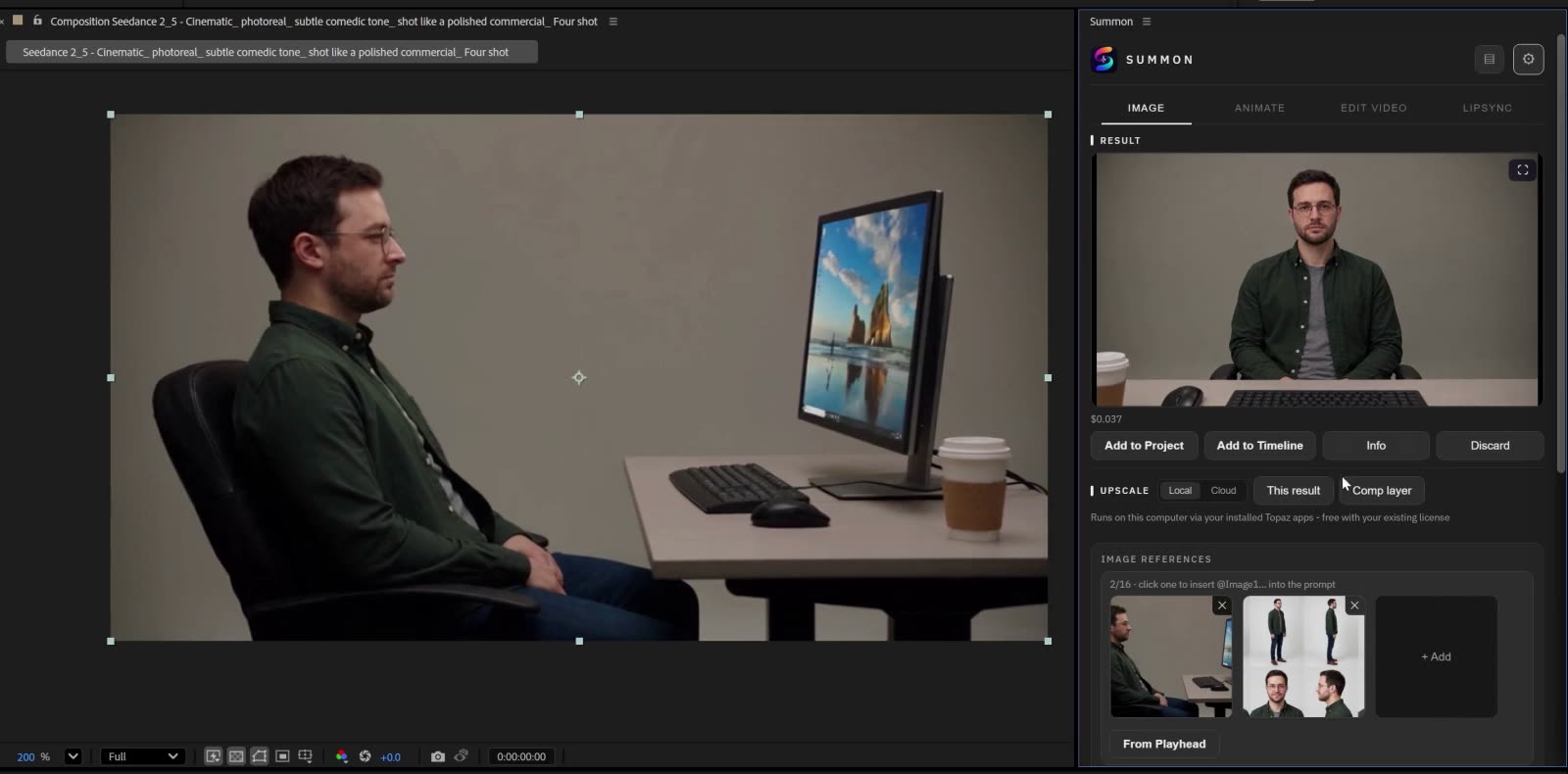
- Edit with references. Editing models show a reference slot. Choose an image, drop a file, drag a take from the Activity drawer, or capture the current frame with From Playhead. The model edits or reinterprets that image according to your prompt; describe the change, not the whole picture.
- Several references. Click a reference thumbnail to insert its tag into the prompt, so you can say which image supplies the scene and which supplies the character.
Edit the frame you've built
In the full tutorial, the playhead is moved to a shot, From Playhead captures it, and a character sheet is added as a second reference to ask for a front-facing angle. Because the capture is what the composition shows, the next step uses the framing you've actually built in After Effects, not the untouched source image.
Prompts in any language
Three buttons sit at the right of every prompt box: EN translates the prompt to English, which most models follow far better; ✦ translates and enhances it for the current model; ↩ restores your original. Translate and enhance are small language-model calls billed by fal.ai, and they cost very little.
The models
The Image tab has 15 built-in models, including Nano Banana Pro and Nano Banana 2, GPT Image 2.5 (Sunburst and Flare, each with an Edit version), Seedream 5.0 Pro and Lite, FLUX.2 [pro], Ideogram V4, Recraft V4 for design, Grok Imagine, Kling Image O3 Edit, and Flux Schnell for fast, cheap drafts. More can be added with the Model Manager.
Start with an image
An image is the cheapest way to try a model and check a prompt before you spend on video. In the full tutorial, a 2K character sheet from Nano Banana Pro had a recorded cost of 15 cents.
Upscale the result
Upscale an image locally through your installed Topaz apps, free with your existing Topaz license, or in the cloud on fal.ai. Upscales appear in History, where filters tell the original from the enlarged version.
What it costs
Like every generation, images run on your own fal.ai key at fal.ai's listed prices, with no Summon markup; the price per image is shown next to each model's name. How the pricing works.
See it in the tutorial
- Create a character reference (0:36)
- Upscale and browse History (1:59)
- Capture a frame for image editing (4:36)
Questions
- Can I edit a frame from my composition?
- Yes. From Playhead captures the frame under the playhead as a reference, and an editing model changes it according to your prompt.
- Can I use more than one reference image?
- Yes, with models that accept several. Click a reference thumbnail to insert its tag into the prompt, so the model knows which image is which.
- Do I have to write prompts in English?
- No. Write in your own language and click EN to translate, or ✦ to translate and enhance it for the current model.
- Where does the result go?
- The image is saved in your project's folders next to the .aep file and appears in the Project panel. Add to Timeline places it in your composition, and it stays in History, ready to use as a reference for video.