New AI models in After Effects, without waiting for an update.
New AI models arrive every day. Summon's Model Manager lets you add most new fal.ai models yourself, often the day they appear, without updating or reinstalling the panel. Search fal.ai's catalog, click Add, and the model appears in the matching tab, ready to generate.
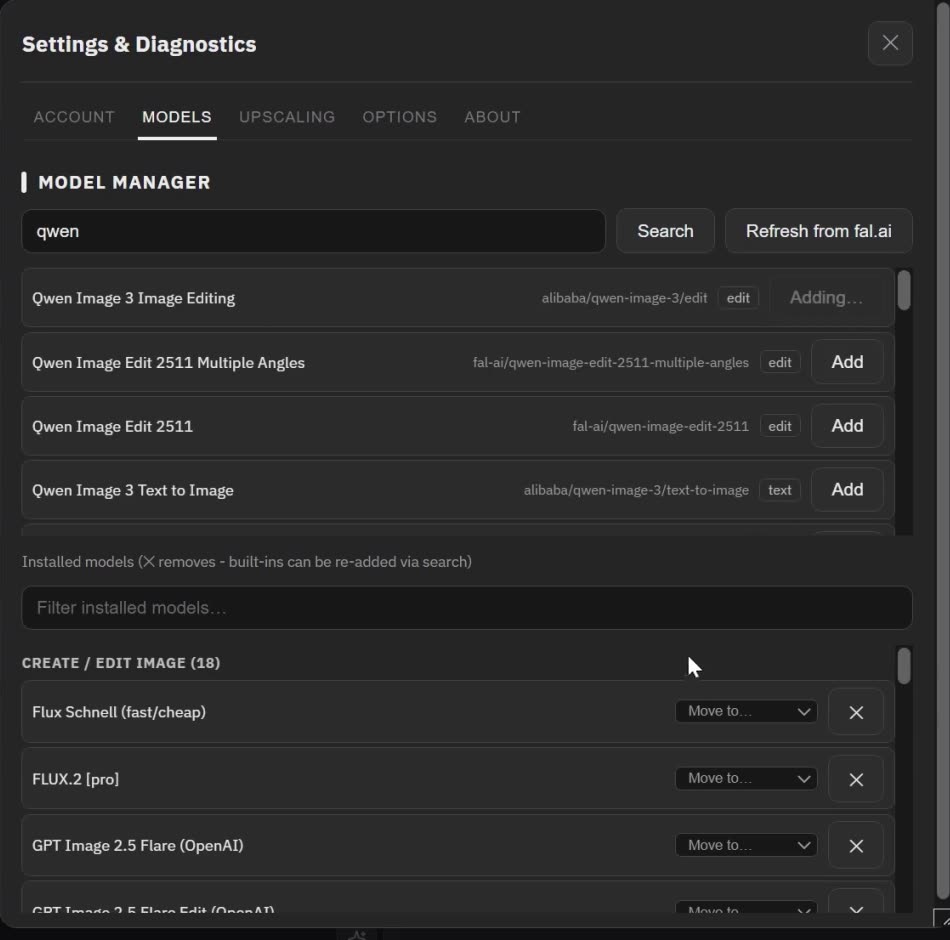
How to add a model
- Click Manage… next to any model menu, or open Settings and choose Models.
- Type part of a model's name and click Search. Summon reads the model's live description from fal.ai and shows what it supports.
- Click Add. The model appears in the tab that matches its kind: Image (create or edit), Animate, Edit Video or Lipsync. If Summon guessed the wrong tab, Move to… puts it under another one.
- Use it like a built-in model, with the same inputs, results, History and spend tracking.
Keep your menus focused
✕ removes a model you don't use, and a removed built-in model can be added back through search at any time. In Options, you can sort the model menus by name, price or recently added.
When a model gains new options
Refresh from fal.ai re-reads the capabilities of your added models, so new options show up in the panel.
What can't be added yet
Some models need a control or an input the panel doesn't have yet, or return a result it can't show yet. The panel tells you when a model can't be added, and support for it arrives with a panel update.
44+ models built in
Summon ships with 44+ curated models, including Nano Banana Pro, GPT Image 2.5, Seedream 5.0 and FLUX.2 [pro] for images; Seedance 2.5, Kling v3 Pro, Veo 3.1 Fast, MiniMax H3 and Ray 3.2 for video; Kling O3 Edit Video and LTX-2.3 Reframe for editing video; and sync-3, HeyGen v3 Precision and OmniHuman 1.5 for lipsync. The Model Manager adds to that list.
Same key, no markup
Added models run on your own fal.ai key, like the built-in ones. fal.ai bills them at its listed prices, and Summon adds no markup. For a model you haven't run yet, the estimate may read "unknown"; the real cost shows after the run.
See it in the tutorial
The full tutorial ends by adding a Qwen image-editing model and using it straight away.
Questions
- Do I need a Summon update to use a new model?
- Usually not: most fal.ai models can be added the day they appear. A model that needs a control the panel doesn't have yet arrives with a panel update.
- Which kinds of models can I add?
- Models for the four tabs: creating and editing images, animating images into video, editing video, and lipsync.
- Does an added model cost more?
- No. It runs on your own fal.ai key at fal.ai's listed prices, with no Summon markup.
- Do my added models stay when I open another project?
- Yes. Your model list belongs to your Summon settings on that computer, not to a project.